Handoff preparation
Carry the goal, current status, responsible owners and acceptance criteria into the next team.
Operations & Delivery
Project health, team utilization, and client communication in one place. Exceptions surface so you can fix them proactively.
Coordinate handoffs, dependencies and exceptions across the teams responsible for delivery.
Carry the goal, current status, responsible owners and acceptance criteria into the next team.
Relate a blocked task to the upstream commitment and the work affected downstream.
Prepare the records, communications and earlier decisions behind a delivery deviation.
Bring open risks, ownership and observed progress together for an operational review.
These feature patterns use connected, permitted information. Supported systems and authorized actions are confirmed for your deployment.
Explore the real Workbench application. Every screenshot below is captured directly from the authentic codebase—preserving the canonical left navigation shell, role-specific Work projections, demonstration telemetry cards, and context-aware Spine Twin controls.
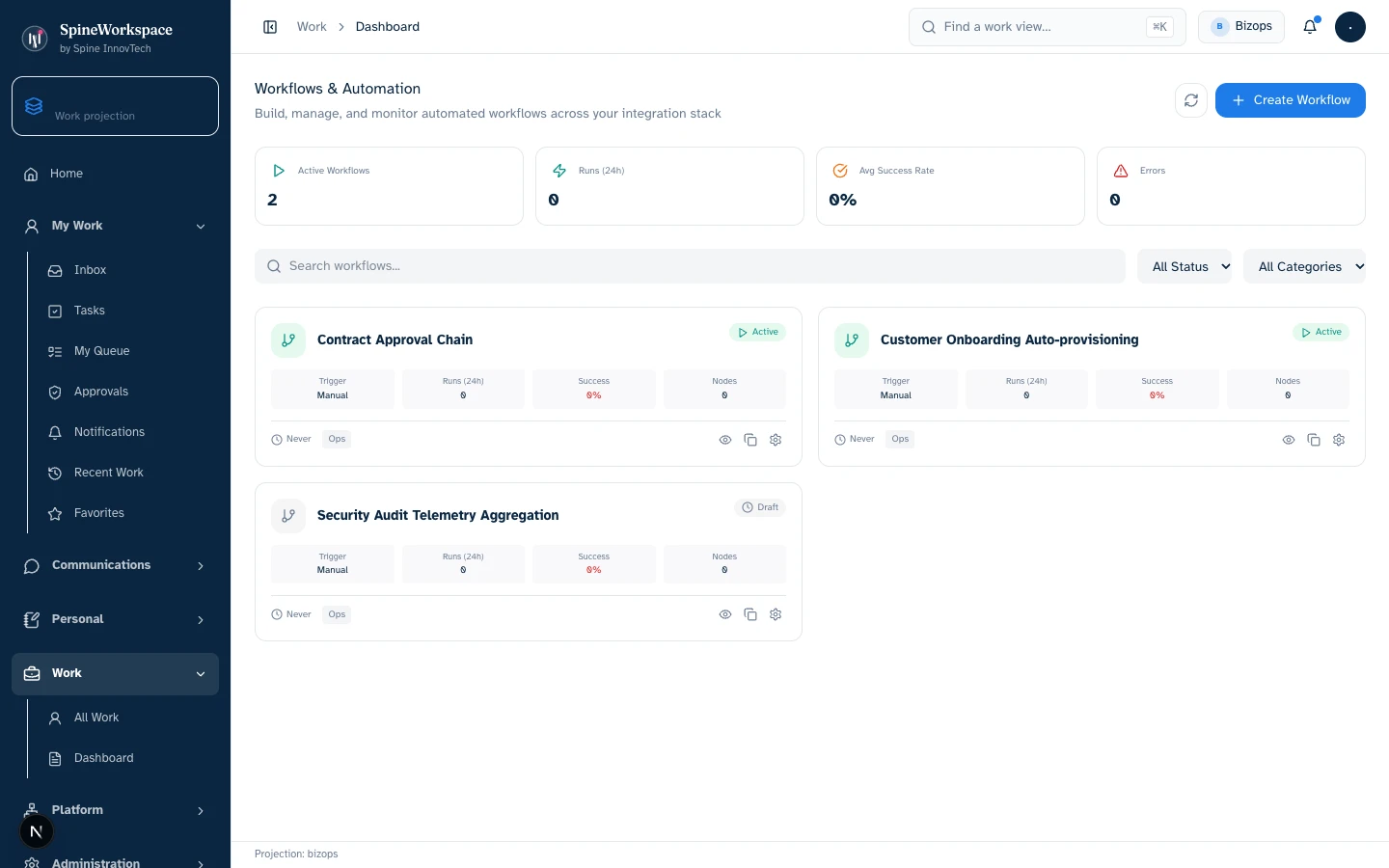
Business Operations projection.Value Architecture · Business Operations Workbench
Cross-functional operational workflows, active execution pipelines, bottlenecks across handoffs, and team capacity utilization meters (demonstration state).
Reallocate workload across operational bottlenecks, trigger automated handoff protocols, and audit cross-departmental SLA adherence.
Eliminates manual daily standup reporting, repetitive status checks across departments, and spreadsheet-based project coordination.
Ensures company operations scale predictably without administrative friction breaking delivery timelines.
Every visual asset is captured from the genuine local Spine Workspace Workbench application running real React components with deterministic demo state. Metrics and figures reflect demonstration fixtures, not audited production data. Projections adapt based on connected sources, credentials, and organizational permissions.
Explore the adaptive architecture01 / Situation
A delivery handoff is blocked by an unresolved dependency in another team.
02 / Twin prepares
Twin gathers the commitment, task history, affected work and responsible owners into escalation options.
03 / Authorized next step
The operations owner approves the revised handoff and coordinates the agreed actions.
Considering SpineWorkspace for Operations? Evaluate this workflow with your team and confirm the supported tools, included capabilities and subscription terms.
Explore subscriptions & pricingIllustrative workflow examples, not measured customer results.
A project timeline slips by 3 days. The PM doesn't flag it. The client finds out when the deliverable is late.
Two senior developers are booked at 120%. You find out when they miss a deadline, not when you could have rebalanced.
Client asks 'where are we on the project?' You check Jira, then Harvest, then Slack, then email. Ten minutes to answer a simple question.
Timeline drift detected on day one. AI alerts the PM with context and suggests a client update for approval.
Utilization signals fire when anyone exceeds 90%. AI suggests reallocation based on skills and priority.
One view: timeline, budget, team utilization, client sentiment. Answer in 10 seconds, not 10 minutes.
Define success against your own baseline. These are evaluation areas, not measured customer results.
Jira, Asana, Monday, Harvest, Toggl — linked together. Every task, every hour, every milestone in one place.
Timeline, budget burn, and utilization — updated live. Green, yellow, or red for every project at a glance.
Timeline slip + budget overrun + unanswered client email = signal. You see it before the client calls.
Reassign a resource, adjust a timeline, draft a client update — AI proposes, you review the evidence and decide.
One click updates the project plan, sends the client notification, and creates follow-up tasks.
Timeline, budget, team utilization, and client sentiment — all in one place. No more checking five tools.
When delivery risks cascade — timeline slips, budgets burn, emails go unanswered — you see it immediately.
AI suggests who to reassign based on skills, availability, and priority. You review and approve.
AI drafts status updates using actual project data — milestones, blockers, revised timelines. You approve before sending.
Status changes and client communications queue for your approval. No scope changes happen without sign-off.
Connects with
KPIs tracked
Book a 20-minute walkthrough. We'll connect your systems and show you the difference live.
SPINE INNOVTECH / WHAT'S NEXT
Explore how our technology connects business context, human judgment and governed AI capability. Start with the company behind the thinking or meet SpineWorkspace, our flagship product.