01
Account Success
Carry the customer story through onboarding, adoption, service, growth and commercial reviews.
- Onboarding plans
- Adoption reviews
Solutions / Spine InnovTech
Finance, customer success, product and leadership need different perspectives, not disconnected versions of business truth. Explore how the same contextual workspace can support different responsibilities, goals and decisions.
By role and function
The categories below describe potential work lenses and solution patterns, not a promise that every connected provider or role-specific projection is deployed for every customer.
Carry the customer story through onboarding, adoption, service, growth and commercial reviews.
Connect receivables, payables, cash and reconciliation to the evidence behind the financial decision.
Carry the customer commitment from discovery through the deal and handoff.
Connect campaign planning and performance to audiences, customer signals and business goals.
Carry the audience, brief, source evidence and approvals through the content lifecycle.
Resolve a case with its customer history, evidence, commitments and escalation context.
Connect product priorities and delivery decisions to customer impact and technical work.
Carry priorities and task context across tools while keeping personal information separate.
Coordinate people work with clear responsibilities and access to permitted employee information.
Relate contracts and obligations to the transaction, source evidence and authorized decision.
See business goals, operating signals and decisions with the responsibilities behind them.
Keep organizational knowledge connected to its sources, ownership and decision history.
By industry and operating model
Prepare financial decisions with assumptions, operational drivers and an evidence trail.
Coordinate handoffs, dependencies and exceptions across the teams responsible for delivery.
Connect pipeline, commercial commitments, billing and revenue handoffs with traceable context.
Connect subscription context, adoption, service and product feedback across the customer lifecycle.
Connect client commitments, delivery work and commercial scope for service teams.
Relate expertise, time, client scope and delivery evidence across an engagement.
Connect production exceptions to quality, suppliers and delivery commitments.
Connect inventory, orders, returns and service to the customer and product story.
Explore the real Workbench application. Every screenshot below is captured directly from the authentic codebase—preserving the canonical left navigation shell, role-specific Work projections, demonstration telemetry cards, and context-aware Spine Twin controls.
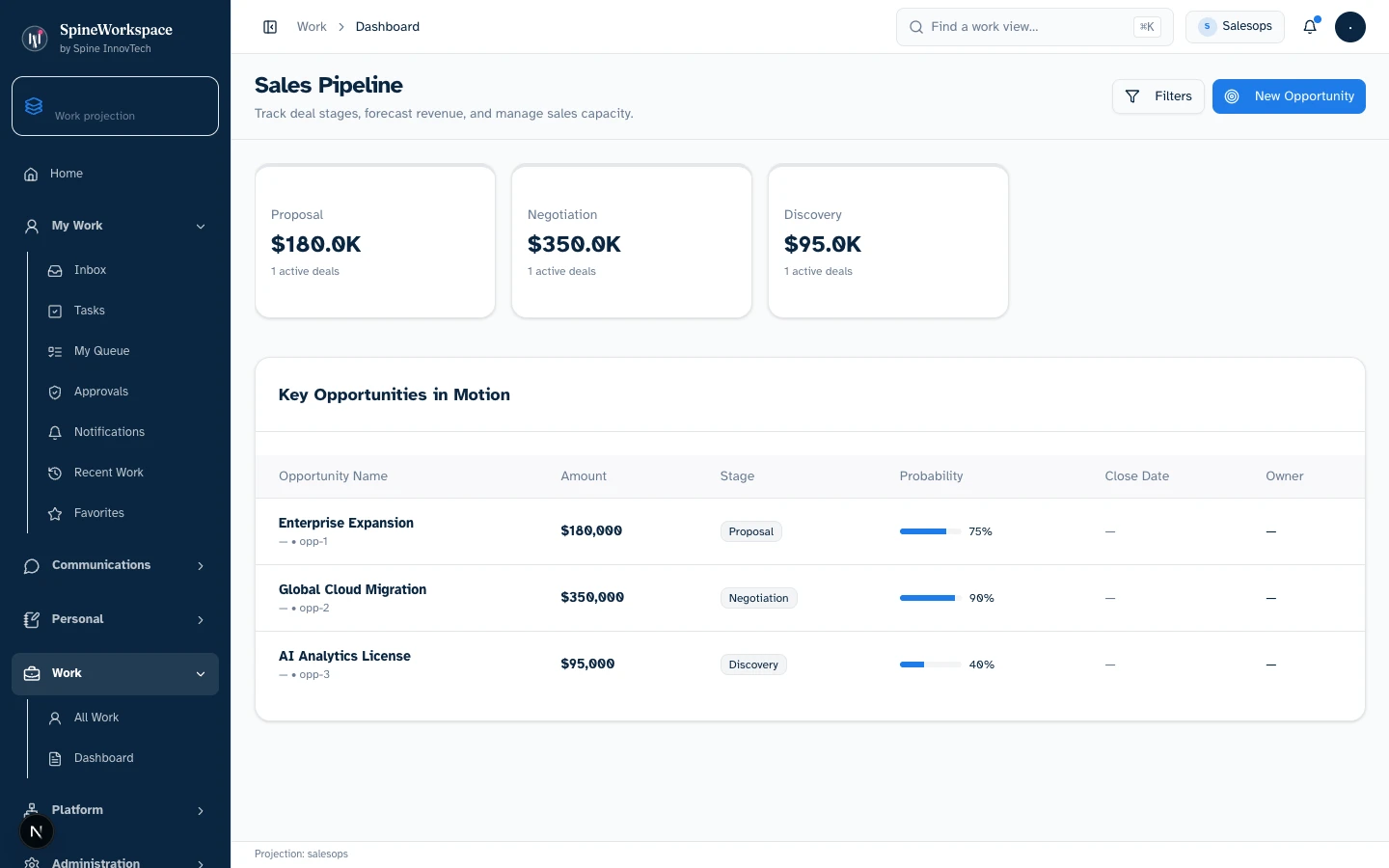
Sales projection.Value Architecture · Sales Workbench
Opportunity ledger displaying deterministic demo deals categorized by Proposal ($180K), Negotiation ($350K), and Discovery ($95K) with win probability bars, stage tags, and deal owners.
Filter opportunities by stage, inspect deal velocity, launch new opportunity flows, and review commercial requirements directly beside customer context.
Eliminates manual pipeline rollups, CRM data-entry reconciliation, and chasing reps for stage probabilities before sales forecast calls.
Keeps sales velocity visible to downstream customer success and finance teams so delivery and billing align with commercial commitments.
Every visual asset is captured from the genuine local Spine Workspace Workbench application running real React components with deterministic demo state. Metrics and figures reflect demonstration fixtures, not audited production data. Projections adapt based on connected sources, credentials, and organizational permissions.
Explore the adaptive architectureOne workspace
Capabilities and views adapt to the work, while business context, policy and authority remain governed.
Why SpineWorkspace
Every tool, every signal — one screen.
The Twin surfaces what matters most.
Nothing executes without your approval.
Continuous data flow across connected systems.
Every approved session makes the system smarter.
Stop switching tabs. Start making decisions.
Demonstration, not customer quotes
Illustrative scenario
“A delivery team carries dependencies and prior decisions into an operational handoff.”
Illustrative scenario
“A finance lead compares an invoice exception with its commitments and supporting evidence.”
Illustrative scenario
“An operator sees the evidence behind a suggestion and decides whether it stands.”
Illustrative scenario
“A leader checks that consequential work still waits for a person.”
SPINE INNOVTECH / WHAT'S NEXT
Explore how our technology connects business context, human judgment and governed AI capability. Start with the company behind the thinking or meet SpineWorkspace, our flagship product.